
This is part of an ongoing series of state-by-state guides to verifying resale certificates. California specifically warrants its own deep dive as the nation’s largest B2B commerce state and one of its most audit-aggressive jurisdictions. You can find the full list of articles here: The Resale Certificate Problem Across the US.
The California Department of Tax and Fee Administration (CDTFA) routinely audits sellers who have accepted resale certificates, and the burden of proof falls squarely on you — the seller — to demonstrate that the certificate was valid at the time of the transaction.
A resale certificate without a verified Seller’s Permit behind it is just paper. One invalid certificate during an audit can trigger cascading assessments on all transactions with that buyer. This guide walks you through exactly how to verify a California Resale Certificate manually using the CDTFA’s official public portal.
What You’re Actually Verifying
California doesn’t issue “resale certificates” as a formal state document — instead, a buyer presents you with their Seller’s Permit number (issued by the CDTFA). Your obligation is to confirm that permit is active and in good standing at the time of each tax-free sale.
According to CDTFA Publication 103, there are two official ways to verify a permit:
- Online Verification: Using the CDTFA Online Services portal.
- Phone Verification: Calling the automated toll-free line at 1-888-225-5263, available 24/7.
California Revenue & Taxation Code §§ 6091–6094
“A seller who takes a resale certificate in good faith will not be held liable for the sales tax even if it is later discovered that the buyer improperly used the certificate. However, a resale certificate is not accepted in good faith if the seller has reason to believe it is not being used for resale purposes.”
The key phrase is “good faith.” Verifying the permit number in real-time through the CDTFA portal is the single strongest proof of good faith you can produce during an audit.
What You Need Before You Start
- The buyer’s Seller’s Permit number. These typically follow a 2-letter prefix format (e.g.,
SR AA-12345678) but older permits may be purely numeric. - A completed resale certificate (such as the CDTFA-230 General Resale Certificate)
- Access to the CDTFA Online Services portal (no login required)
- 2–3 minutes per certificate
description How to Verify a California Resale Certificate on the CDTFA Portal
6 Steps 5 minutes Created by ExemptCheck
How to Verify a California Resale Certificate on the CDTFA Portal
Pro-Tip:
Always strip letters and dashes before searching. For example, a permit showing as “SR AA-12345678” should be entered as “12345678”. If you have a legacy numeric-only permit with fewer than 9 digits, zero-pad the front to reach 9 digits (e.g., “99394823” becomes “099394823”).
Open the official CDTFA Online Services portal. The Verification URL takes you directly to the “Verify a permit, license or account” page — no login or account required.
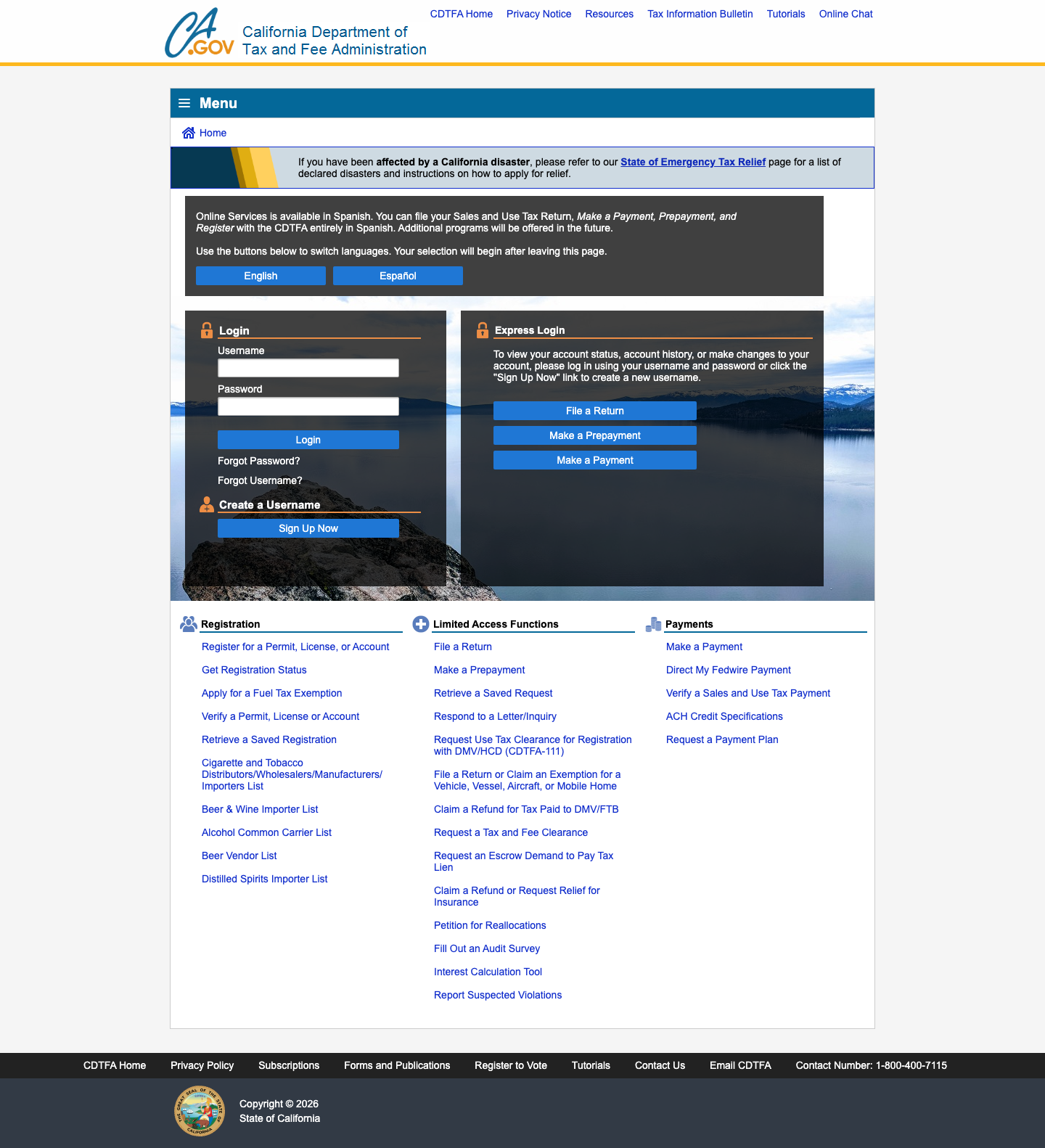
Click "Verify a Permit, License or Account"
If you land on the CDTFA main login page, scroll down to the Registration column and click “Verify a Permit, License or Account.” The direct URL above skips this step entirely. You will arrive at the Search Criteria form.
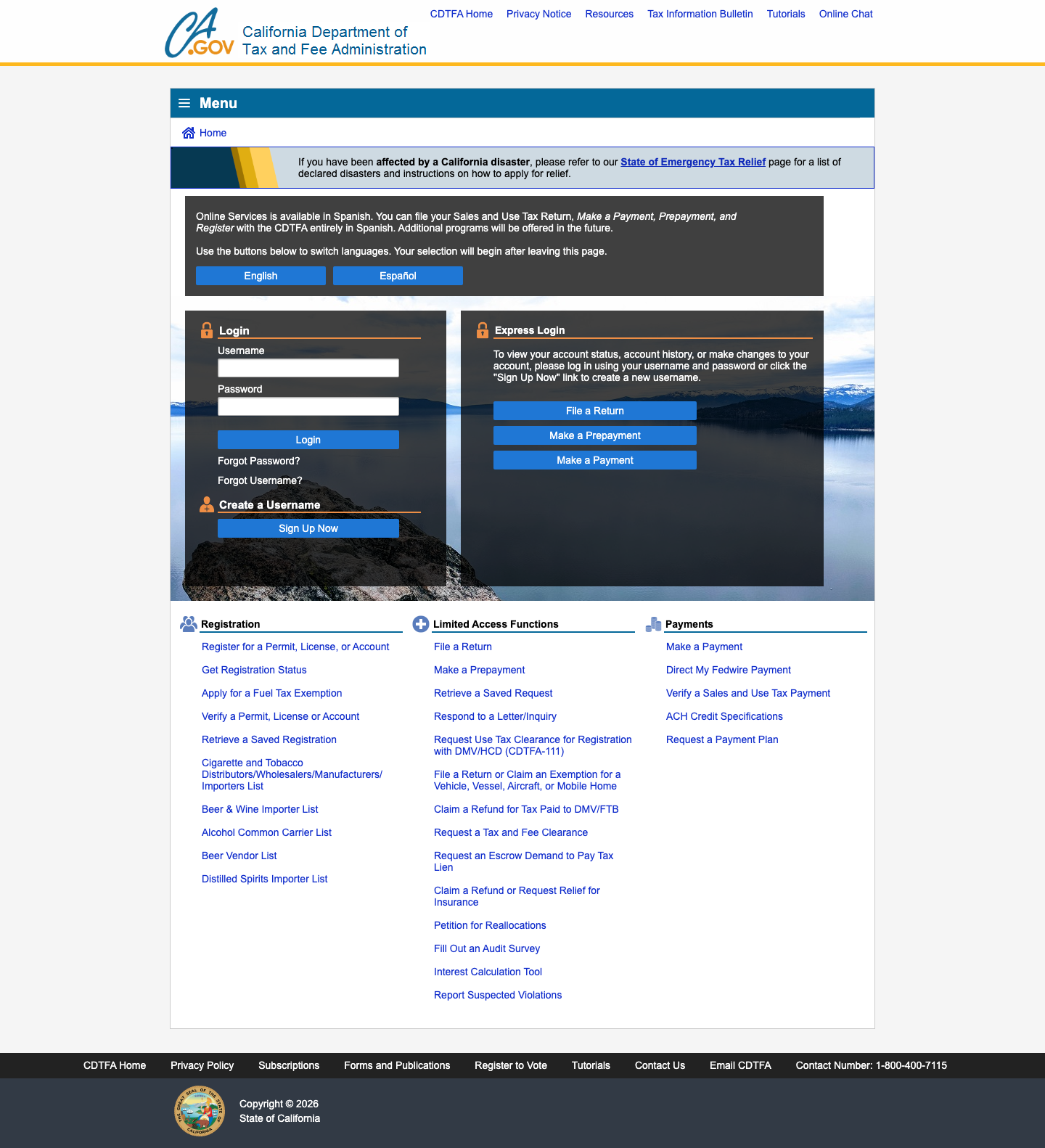
Select "Sellers Permit" from the taxable activity dropdown
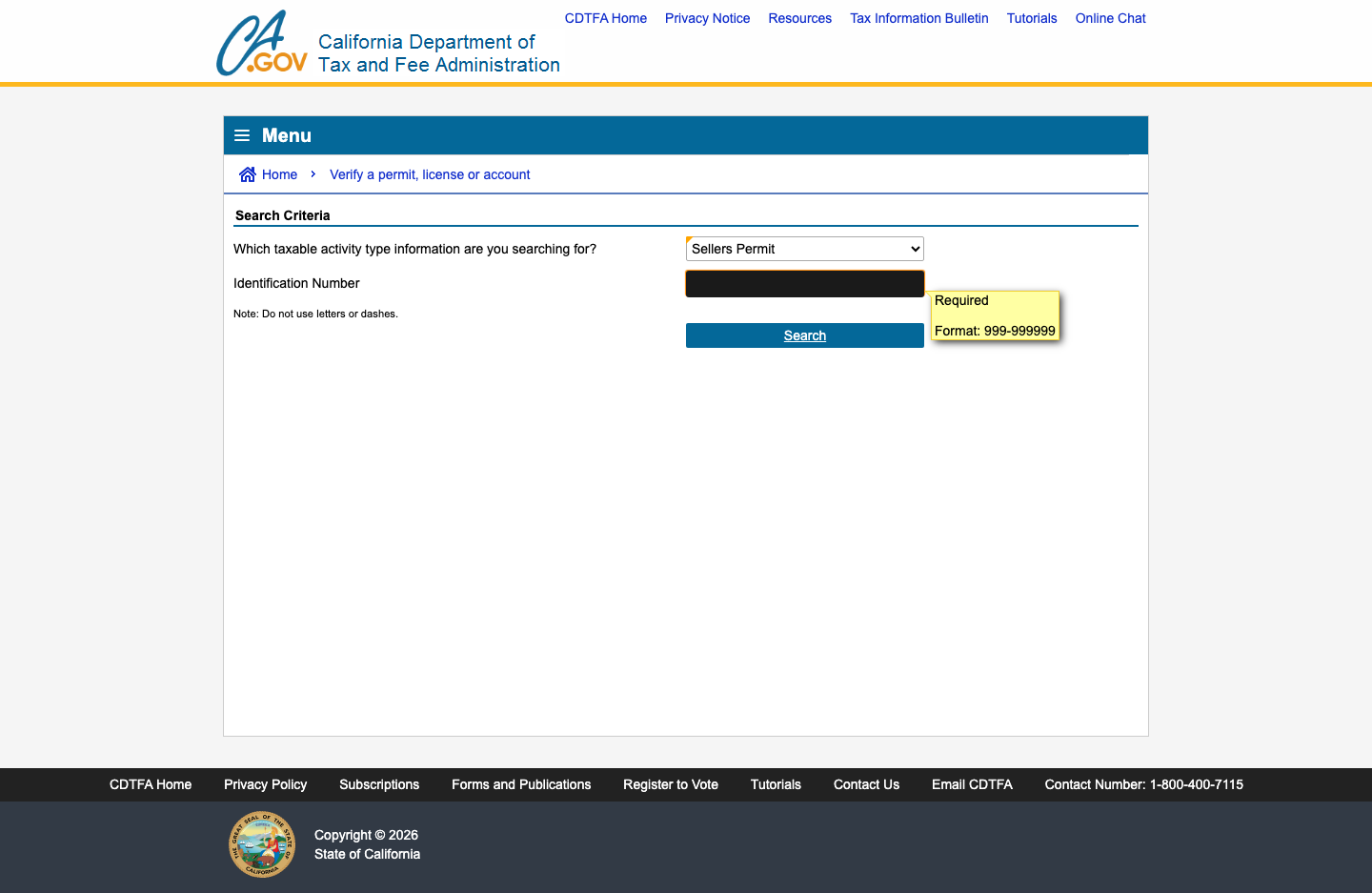
The form asks “Which taxable activity type information are you searching for?” Open the dropdown and select Sellers Permit. This is the correct type for standard B2B resale certificate verification.
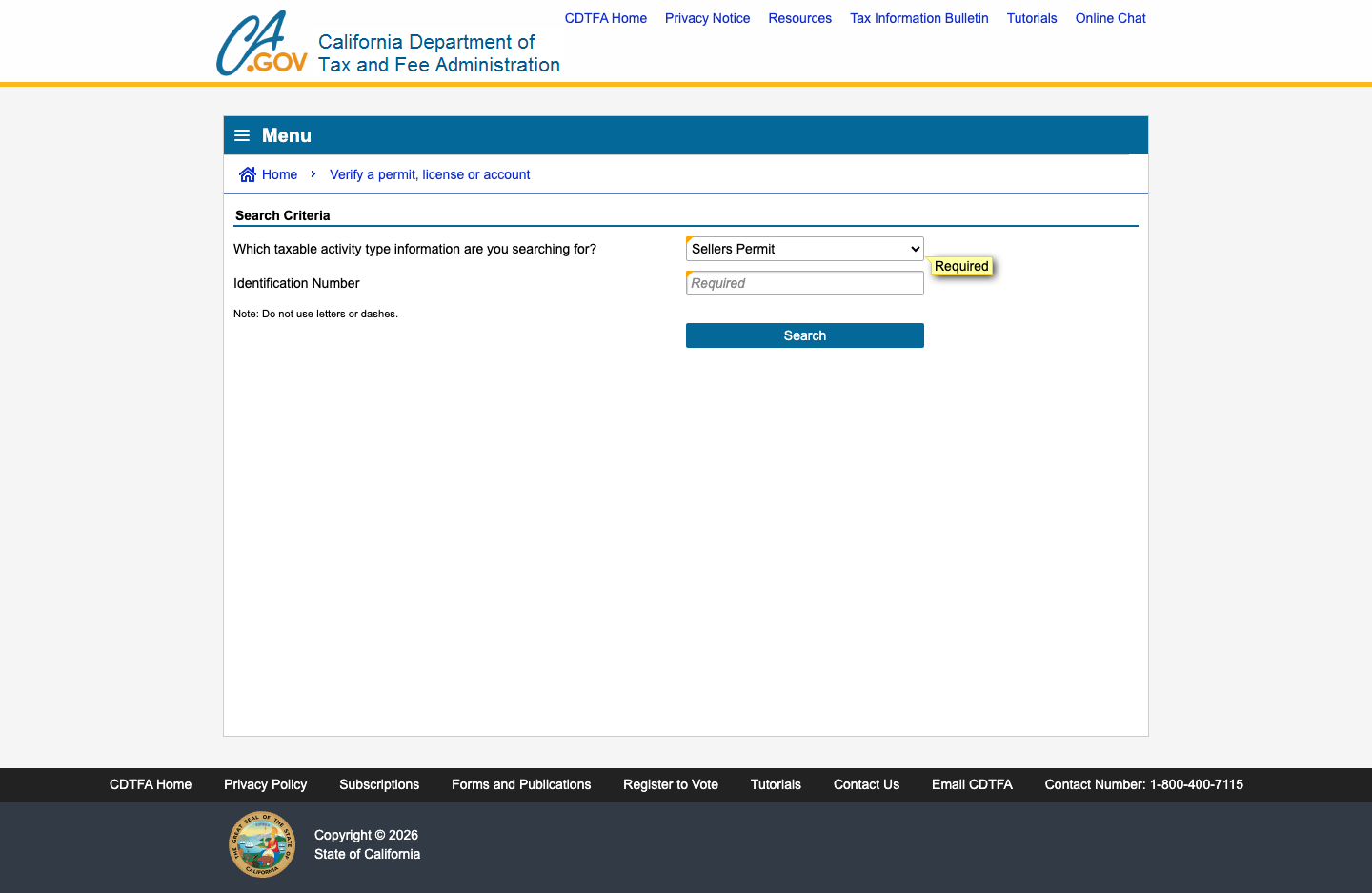
Enter the permit number — digits only, no dashes
In the Identification Number field, type the permit number. While the portal accepts various formats, the safest approach is to strip all letters and dashes and enter the numeric digits only. Zero-pad to 9 digits if needed.
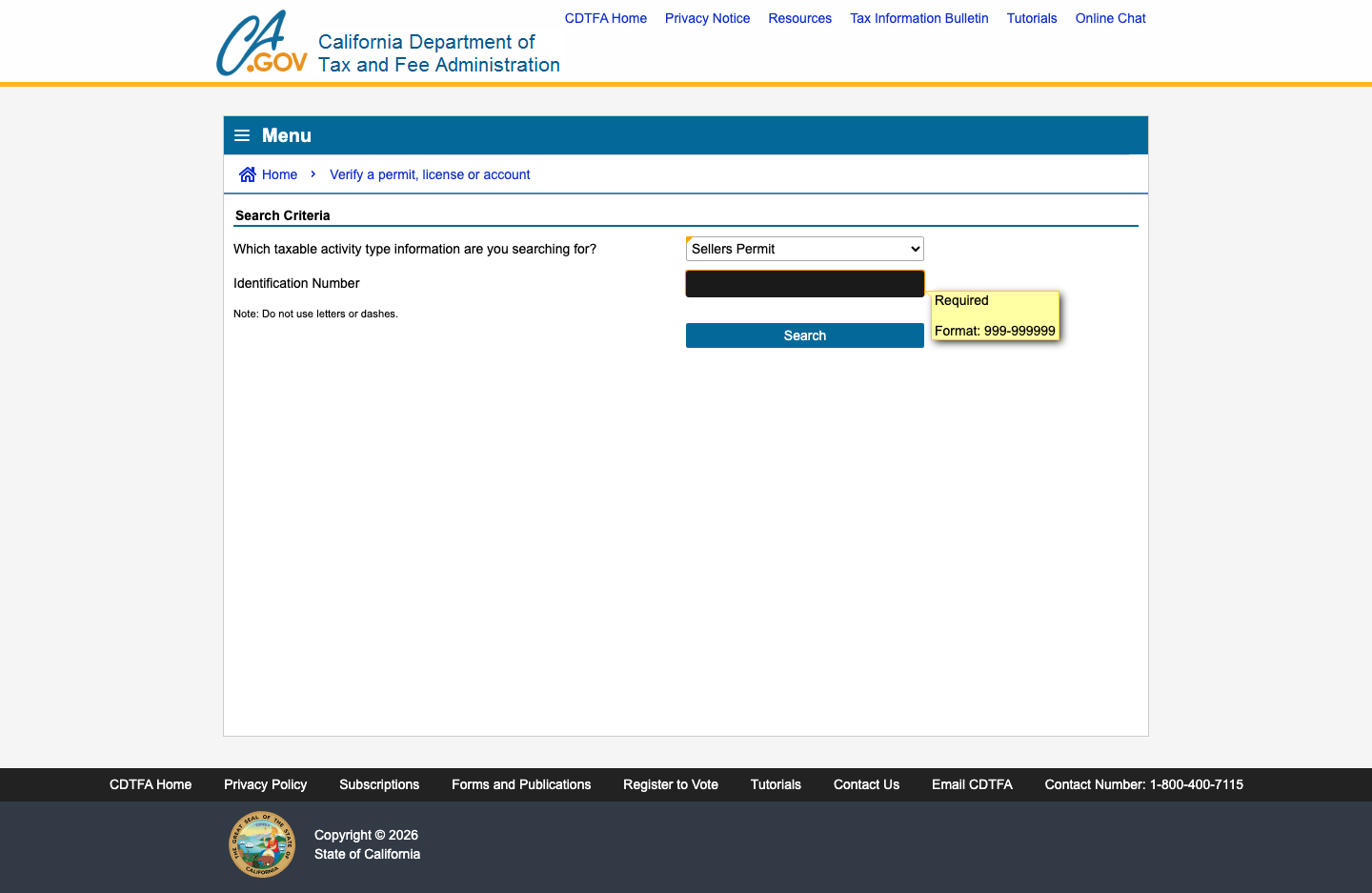
Click "Search" and wait for the result
Click the blue Search button. The CDTFA database is queried in real-time and the result renders inline on the same page within a few seconds.
Confirm "This is a valid Sellers Permit." and save your evidence
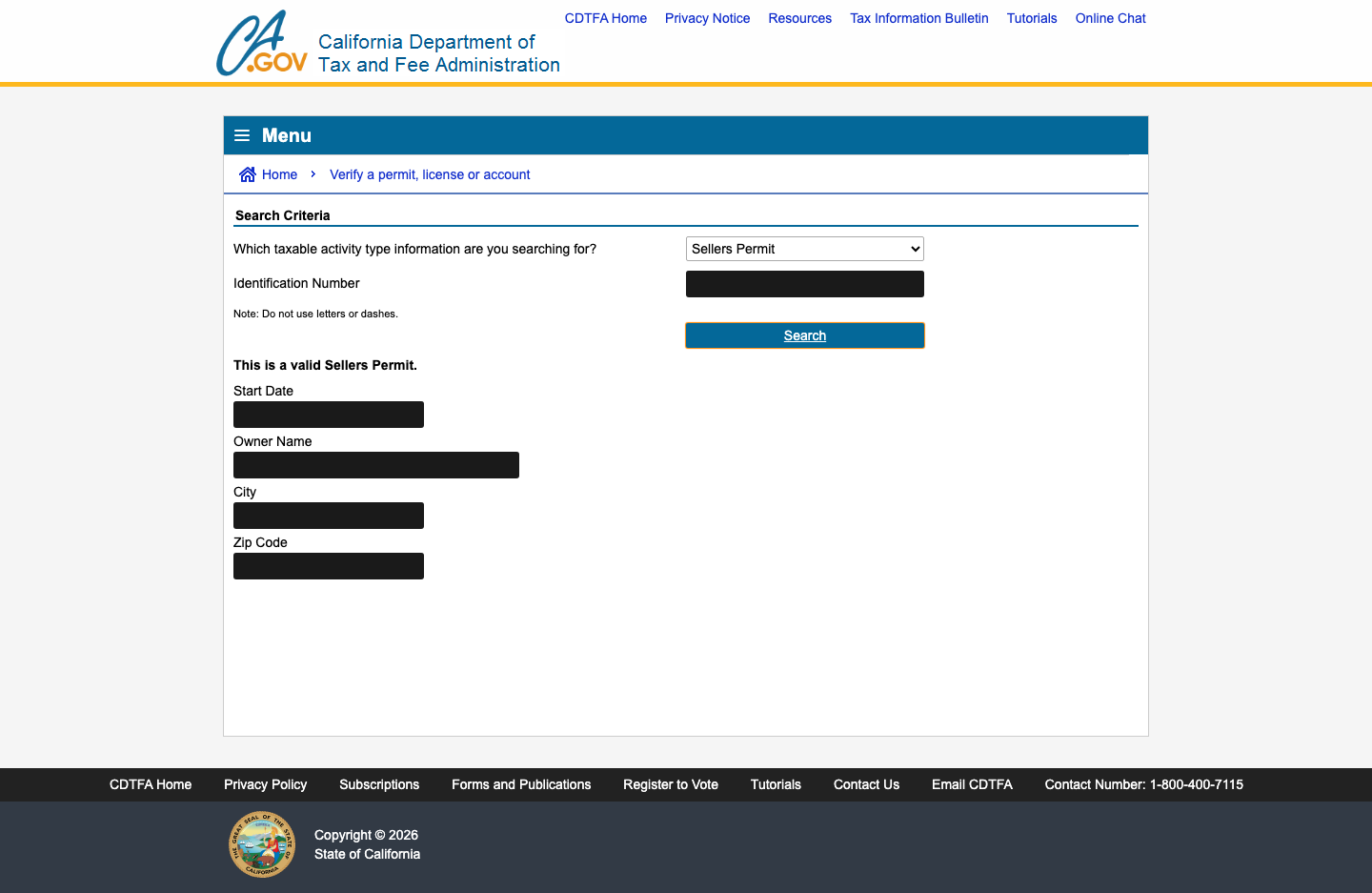
A valid permit shows the bold message “This is a valid Sellers Permit.” along with the Start Date, Owner Name, City, and Zip Code. An invalid result means the permit is not active — do not proceed with the tax-free sale. Take a dated screenshot or PDF (Cmd+P → Save as PDF) immediately and attach it to your transaction records.
Understanding the Verification Result
When the CDTFA returns a valid result, you will see:
| Field | What It Means |
|---|---|
| ”This is a valid Sellers Permit.” | The permit is currently active in the CDTFA database |
| Start Date | The date this permit was originally issued |
| Owner Name | The legal business name registered to the permit |
| City / Zip Code | The registered business location |
Important: A “valid” result confirms the permit is active right now. It does not retroactively confirm the permit was active on a past transaction date. For audit defense on historical sales, re-verify as close to the transaction date as possible and retain the dated evidence.
If the permit is invalid, your two options are:
- Collect sales tax on the transaction
- Decline the sale until the buyer provides valid credentials from a different active account
What Makes a Certificate Valid?
Simply having a permit number isn’t enough. According to CDTFA Publication 103, a document (letter, note, or form) is only a valid resale certificate if it contains:
- Purchaser Information: The name and address of the purchaser’s business.
- Permit Number: The purchaser’s seller’s permit number (or a written explanation as to why one isn’t required).
- Property Description: A description of the property to be purchased.
- Required Resale Language: A statement that the property is being purchased “for resale.” Note: Phrases like “nontaxable” or “exempt” are strictly not acceptable under California law.
- Signature & Date: The signature of the purchaser or an authorized representative, and the date the certificate was issued.
Pro-Tip:
Digital signatures are acceptable in California, provided they conform to California Government Code section 16.5 (unique to the person, verifiable, and under their sole control).
Exceptions: When a Permit Isn’t Required
Some buyers are not required to hold a California Seller’s Permit. According to the CDTFA Tax Guide for New Permit Holders, this typically applies to:
- Interstate/Foreign Commerce: Businesses that sell exclusively to customers outside of California.
- Tax-Exempt Goods: Businesses that only sell products that are tax-exempt by nature (e.g., raw fruits and vegetables).
In these cases, the buyer must still provide a resale certificate, but they must include a written explanation on the form stating why they are not required to hold a permit.
Common Mistakes to Avoid
1. Accepting certificates without verifying Many sellers skip verification entirely. This is the most costly mistake — if the CDTFA finds your buyer was not actually engaged in resale, you owe the full tax plus penalties.
2. Entering the permit number with dashes
The CDTFA portal explicitly says “Do not use letters or dashes.” Entering 99-394823 instead of 099394823 will return no results, making a valid permit look invalid.
3. Verifying once and assuming it’s permanent A Seller’s Permit can be revoked or suspended at any time. Best practice: re-verify quarterly for repeat customers, and on every transaction for new buyers.
4. Not retaining dated documentation The CDTFA requires sellers to maintain exemption certificates for at least 4 years. Store the verification PDF alongside the signed resale certificate, linked to the specific invoice.
Penalties for Non-Compliance
Misuse of a resale certificate carries heavy penalties for both the buyer and the seller. According to Revenue and Taxation Code section 7153, knowingly using a certificate to evade tax can result in:
- Monetary Penalties: 10% of the tax due or $500 (whichever is greater) for each purchase.
- Fraud Assessments: A 25% penalty for intent to evade the tax.
- Criminal Liability: Fines between $1,000 and $5,000 and/or up to one year in county jail.
For sellers, the risk is primarily civil, but knowingly accepting a fraudulent or invalid certificate can expose your business to the same tax assessments and penalties as the buyer.
Audit Tip
During a CDTFA audit, examiners will specifically ask for the date you verified each permit. A PDF or screenshot with a visible timestamp is far stronger evidence than verbal assurance.
The Auditor’s Perspective: What to Expect
During a sales tax audit, a CDTFA auditor will typically select a representative sample of your exempt transactions. For each transaction in the sample, they will request the signed resale certificate and your proof of verification.
If you are missing the certificate, or if the permit was inactive on the transaction date, the auditor will assess back-tax on that specific sale and then “extrapolate” that error rate across your entire revenue for the audit period. This means a single unverified $500 sale could lead to a $50,000 assessment if your overall volume is high.
Official Sources & Further Reading
- CDTFA Publication 103: Sales for Resale - Valid Resale Certificates
- CDTFA Tax Guide: Managing Your Sales - Recordkeeping & Exemptions
- Official Form CDTFA-230: General Resale Certificate (PDF)
account_balance The State-by-State Verification Series
ExemptCheck is mapping the complexities of US sales tax compliance. This technical guide is part of our ongoing series designed to equip tax professionals and finance teams with the actionable intelligence required to perform rigorous, audit-defensible certificate verification across all 50 states.
To see the full list of state guides in this series, visit: The Resale Certificate Problem Across the US .